User Guide
🔄 Update notice
We're rolling out a new version with improved download reliability and subtitle detection. It fixes failures when saving large files, subtitle options not appearing on some sites, and problems handling encrypted streams. If a video wouldn't save for you before, please give it another try.
Extension updates are distributed through Chrome Web Store review and applied automatically by
Chrome, so there's nothing to install (it can take a few days to reach you). To get it right
away, open chrome://extensions, turn on Developer mode (top right), then
click Update. Your current version is shown on that same page.
🐛 Still not working? Tell us
If a video still won't detect or download after updating, use "Report a problem" in the extension's side panel — diagnostic information is attached automatically so we can find the cause. Tick "receive a reply" and leave your email, and we'll send you a notification once it's resolved. You can also email support@streamsave.youriahn.com directly.
🚀Quick Start
- Install the extensionAdd StreamSave to Chrome. It runs quietly in the background — nothing happens until you play a video.
- Play a videoOpen a page with streaming video (HLS, DASH or MP4). StreamSave detects it automatically and opens the side panel with the media list.
- Pick quality & formatSelect a resolution and choose MP4 or, on Pro+ plans, MP3. There is no quality restriction on any plan.
- Click DownloadThe file saves directly to your device — full quality, on every plan. Free tier has a 30-minute cooldown between downloads.
✏️Renaming the saved file
You can rename the file before downloading it. Click the ✏ icon next to the filename shown on a video's card in the side panel to edit it right there.
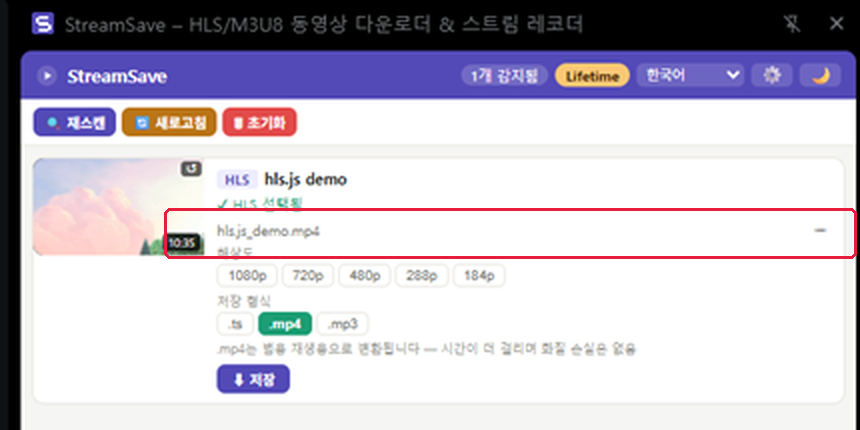
Press Enter to save or Esc to cancel. The extension (.mp4/.ts/.mp3) is added automatically based on the format you pick below, so you don't need to include it in the name.
📥Tracking and cancelling a download
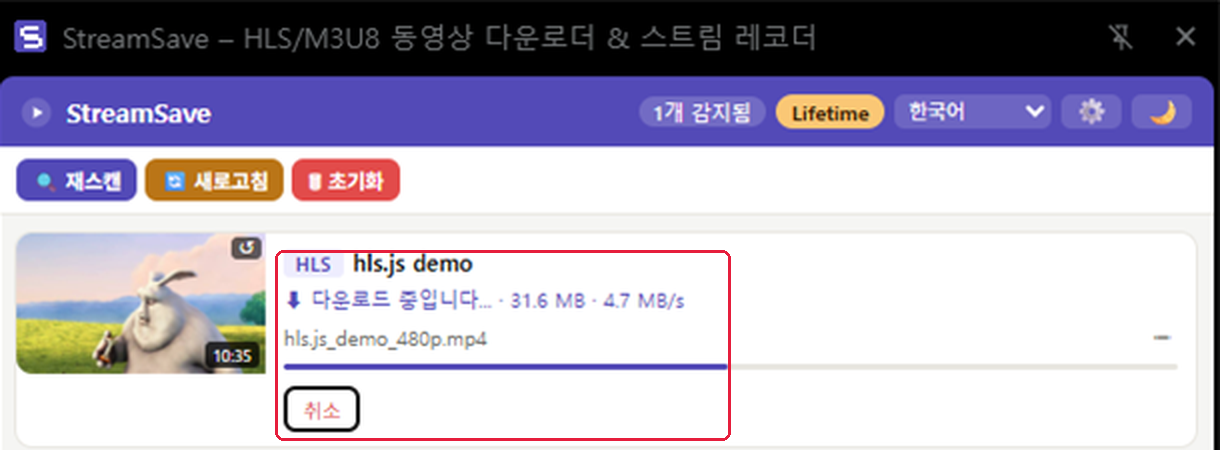
Once a download starts, the card shows a progress bar with a live transfer speed (e.g. 31.6 MB · 4.7 MB/s). Changed your mind? Click Cancel at any point to stop it.
📋What's included in each plan
Every plan — including Free — downloads in full quality with no resolution cap, whatever the source stream provides. Trial and paid plans add:
| Feature | Free | 72h Trial | Pro | Lifetime |
|---|---|---|---|---|
| Download (any quality, no resolution cap) | ✓ | ✓ | ✓ | ✓ |
| Batch downloads | — | ✓ | ✓ | ✓ |
| Subtitle extraction (.vtt/.srt) | — | ✓ | ✓ | ✓ |
| MP3 conversion | — | ✓ | ✓ | ✓ |
Every new install starts with a 72-hour trial that unlocks every Pro feature automatically. See pricing for Pro/Lifetime plans.
Free-tier downloads have a 30-minute cooldown between them. Watching a short video (from the side panel) reduces the remaining cooldown by 10 minutes at a time — entirely optional.
🎉Friend Referral Event
Invite friends to StreamSave and both of you benefit, in two separate steps: when a friend enters your code the first time they ever verify a trial email, their trial extends from 3 days to 7 days — before they've paid anything. Later, if that friend goes on to subscribe to a paid plan (Monthly, Yearly, or Lifetime, any payment channel), you get 1 month of Pro free.
- Find your personal referral code on the License screen inside the extension (shown once you have an active trial or license), and in your purchase confirmation email.
- Friends enter your code in the optional "Referral code" field the first time they ever verify a trial email — that's what extends their trial. Entering it later, or on an account that has already used a trial before, has no effect.
- Your 1-month reward is credited automatically the moment your friend's paid purchase is confirmed — a separate step from the trial extension, and no action needed on your part.
📦Downloading multiple videos at once Pro+
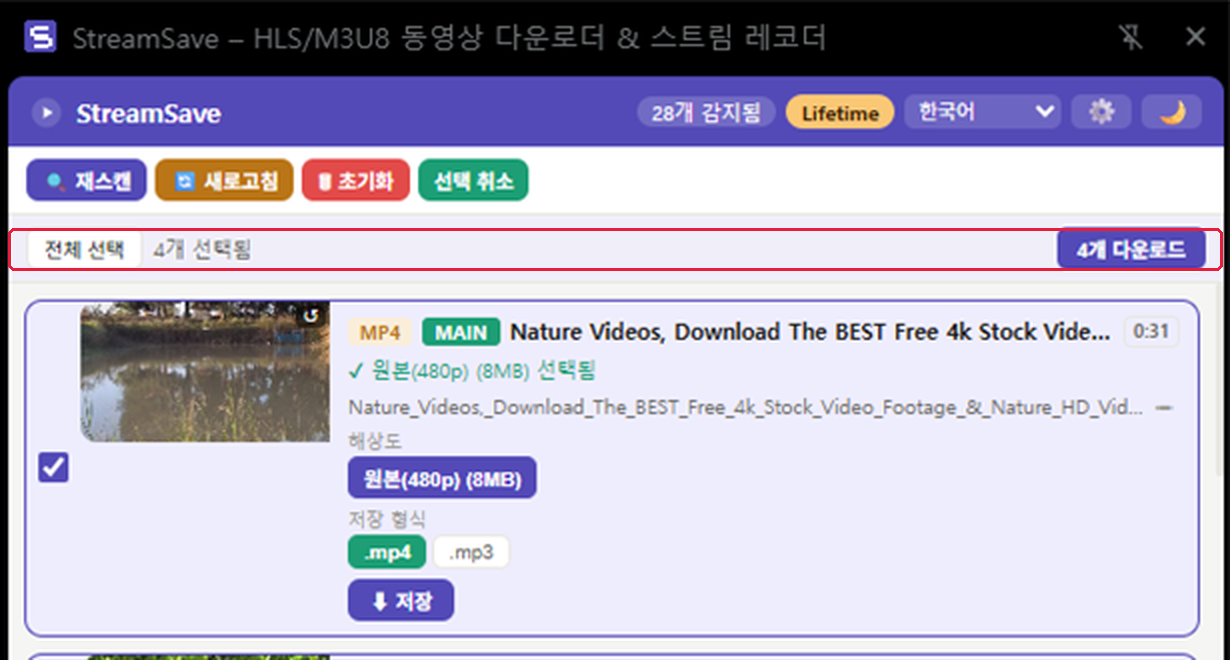
When a page has several videos detected, click Select at the top of the list to enter batch mode. Check the ones you want and click "Download N", and they'll be saved one after another.
💬Extracting Subtitles Pro+
When a detected stream includes a subtitle track, a subtitle button appears in the side panel next to the video entry. Click it to save the track as a .vtt or .srt file. This works for HLS streams that publish subtitles in their manifest — subtitle tracks in DASH streams are not currently supported.
🎧Converting to MP3 Pro+
Pick MP3 as the output format before downloading, instead of MP4. StreamSave downloads the video and converts the audio track locally in your browser — no file is ever uploaded anywhere for this conversion.
⚙️Exploring settings
Click the gear icon in the top-right of the side panel to adjust the following.
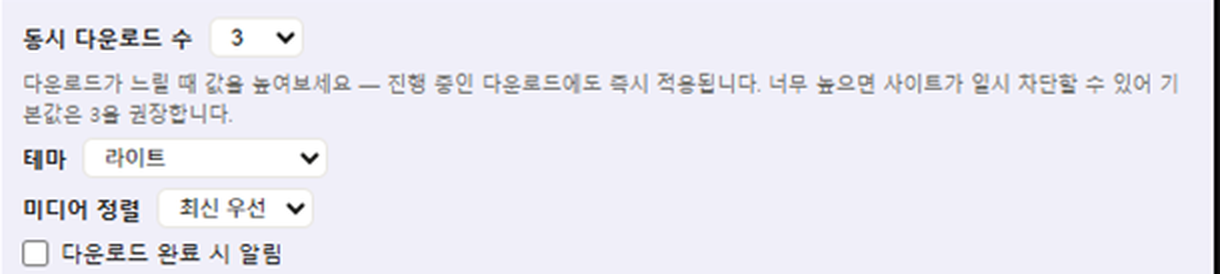
- Concurrent downloads: how many segments to fetch at once (default 3, range 1–32). Raise it if downloads feel slow — it applies immediately, even to downloads already in progress. Setting it too high can get you temporarily rate-limited by some sites.
- Theme: choose light or dark mode.
- Media sort: change the order videos appear in the detected list.
- Notify on download complete: turn this on to get a desktop notification when a download finishes.
🕵️Enabling Incognito Access
By default, Chrome extensions cannot see anything happening in private/incognito windows. To let StreamSave detect media there too:
- Go to
chrome://extensions - Find StreamSave and click Details
- Turn on Allow in Incognito
Note that incognito windows don't share cookies/login sessions with your normal window, so pages that require sign-in may need you to log in again there. You'll find the same guidance in the settings panel:

❓FAQ & Troubleshooting
Why can't I download this video?
There are two main cases.
1. DRM protection (Widevine, PlayReady or FairPlay) — StreamSave intentionally does not support or bypass DRM.
2. Site-specific encryption — some sites declare a standard scheme (HLS AES-128) but actually wrap the decryption key in their own custom format. Such streams only play in that site's own player and cannot be saved by any standards-compliant download tool. For these you'll see the message "This site delivers its decryption key in a non-standard, site-specific format, so downloads aren't supported here."
If it's neither, try reloading the page or pressing rescan in the side panel. If it still fails, use "Report a problem" in the side panel — diagnostics are attached automatically so the cause can be identified.
The video has subtitles, but no subtitle option appears
StreamSave can save subtitles separately only when the stream provides them in a standard way — either declared as a subtitle track in the HLS manifest (EXT-X-MEDIA), or fetched by the page as a separate .vtt/.srt file.
Some sites burn subtitles directly into the video image (hardsubs) or draw them with their own custom mechanism. In those cases there is no separate subtitle file to extract, so no subtitle option is shown. If the subtitles are burned in, they will simply appear on screen when you play the downloaded video.
Does StreamSave support YouTube?
No. Support for YouTube was intentionally removed — YouTube's Terms of Service prohibit third-party downloading of its content, and StreamSave blocks it by design.
The side panel isn't showing my video
Some pages load their video player after the page finishes loading. Try waiting a few seconds after playback starts, or use the manual rescan button in the side panel. If it still doesn't appear, please report it with the page URL so it can be investigated.
I lost my license key or it's not working
Your license key was emailed to you at purchase. If you can't find it or it's being rejected, contact support@streamsave.youriahn.com with your purchase email and we'll help you recover it.